Kubernetes security is complex but critical for protecting your clusters, workloads, and sensitive data. This guide breaks down the key security measures you need to implement, focusing on access control, infrastructure hardening, workload isolation, and compliance alignment. Here’s what you’ll learn:
The article also introduces tools like Cycore to automate security tasks, reducing manual effort and ensuring continuous compliance. Whether you're securing a single cluster or managing multi-tenant environments, these practices form the backbone of a secure Kubernetes setup.
Securing the Kubernetes Infrastructure
The security of your Kubernetes environment hinges on the control plane, nodes, and access management. A weakness in any of these areas can jeopardize the entire cluster. Start by reinforcing the control plane to establish a solid base for your security efforts.
Hardening the Control Plane
The API server acts as the entry point to your cluster. To protect it, ensure that it uses TLS on port 6443 or 443. Limit its exposure by confining it to private networks or routing access through bastion hosts. For user authentication, opt for OpenID Connect (OIDC) instead of static tokens or client certificates, as these lack easy revocation methods.
The etcd datastore, which holds cluster data, demands special care. As Kubernetes documentation states, "Write access to the etcd backend for the API is equivalent to gaining root on the entire cluster, and read access can be used to escalate fairly quickly". To secure etcd, place it behind a firewall, enforce mutual TLS (mTLS) using a dedicated Certificate Authority, and enable encryption at rest with an EncryptionConfiguration object. Only the API server should interact with etcd - no exceptions.
For the kube-controller-manager, enable the --use-service-account-credentials flag to ensure it operates with individual service account permissions instead of a single privileged identity. Activate admission controllers like NodeRestriction to limit what kubelets can do, and CertificateSubjectRestriction to prevent the issuance of certificates with system:masters privileges. The system:masters group should only be used as an emergency, "break-glass" mechanism, not for day-to-day administration.
Setting Up Kubernetes RBAC for Access Control
Role-Based Access Control (RBAC) helps enforce the principle of least privilege by defining who can access specific resources in your cluster. Use Role and RoleBinding for permissions limited to a namespace, rather than ClusterRole and ClusterRoleBinding. Avoid using wildcards (*) for resources or actions, as these grant overly broad access, including to future object types. Be cautious with permissions like escalate, bind, and impersonate, as they allow users to elevate their privileges. For Secrets, refrain from granting list or watch permissions, as these expose the full content of Secrets within a namespace.
Here’s an example Role that gives read-only access to Pods in the production namespace:
apiVersion: rbac.authorization.k8s.io/v1
kind: Role
metadata:
  namespace: production
  name: pod-reader
rules:
- apiGroups: [""]
  resources: ["pods"]
  verbs: ["get", "list"]
This Role can be linked to a specific user using a RoleBinding:
apiVersion: rbac.authorization.k8s.io/v1
kind: RoleBinding
metadata:
  name: read-pods
  namespace: production
subjects:
- kind: User
  name: jane@example.com
  apiGroup: rbac.authorization.k8s.io
roleRef:
  kind: Role
  name: pod-reader
  apiGroup: rbac.authorization.k8s.io
To enhance security, set automountServiceAccountToken: false in your Pod or ServiceAccount configurations. This prevents API credentials from being automatically mounted where they aren't needed. Review and adjust access permissions at least every two years to ensure they remain appropriate.
Once access control is in place, shift focus to securing the worker nodes that run your workloads.
Node Security Best Practices
Worker nodes require robust operating system-level protection. The Kubelet, which manages nodes and containers, exposes HTTPS endpoints that could allow unauthorized access if left unsecured. Always enable Kubelet authentication and authorization in production environments, and use the --config flag to avoid permissive default settings. Activate the NodeRestriction admission controller to ensure each kubelet can only modify its own Node object and the Pods assigned to it. Block Pods from accessing the cloud metadata API (169.254.169.254) using network policies to prevent unauthorized access to sensitive credentials.
Reduce potential kernel vulnerabilities by blacklisting unnecessary modules like DCCP and SCTP in /etc/modprobe.d/kubernetes-blacklist.conf. Starting with Kubernetes 1.27, enable the RuntimeDefault seccomp profile for all workloads to limit dangerous system calls from containers. For applications requiring extra isolation, use Node Selectors and Taints/Tolerations to run them on dedicated nodes, or implement RuntimeClass for sandboxed runtimes.
Regularly rotate infrastructure credentials, including kubelet client certificates, using automation to minimize the risk of compromised credentials. Disable unused ports on nodes and ensure only the API server communicates with etcd.
sbb-itb-ec1727d
Workload and Network Protection
Once your infrastructure is secure, the next step is safeguarding your workloads and controlling how they communicate. Default inter-pod communication can expose clusters to vulnerabilities. Protecting workloads involves enforcing runtime policies, isolating traffic, and managing sensitive data effectively.
Enforcing Pod Security Standards
After securing the infrastructure, it's crucial to implement strict workload policies to minimize container-level risks. Kubernetes provides three Pod Security Standard (PSS) levels: Privileged (no restrictions), Baseline (blocks known privilege escalations), and Restricted (follows current hardening practices). Starting with Kubernetes v1.25, the Pod Security Admission (PSA) controller - operating at the namespace level - replaced the deprecated PodSecurityPolicy.
To apply PSS, label namespaces with the desired policy level and action mode. The action modes include:
A practical approach is to begin with audit and warn modes at the target security level before switching to enforce. Unlabeled namespaces signal potential security gaps.
For instance, the Restricted policy mandates containers to run as non-root, disables allowPrivilegeEscalation, and requires dropping all capabilities except NET_BIND_SERVICE. Here's an example of configuring a namespace for Restricted enforcement:
apiVersion: v1
kind: Namespace
metadata:
  name: production
  labels:
    pod-security.kubernetes.io/enforce: restricted
    pod-security.kubernetes.io/audit: restricted
    pod-security.kubernetes.io/warn: restricted
Similarly, configure your Pod’s securityContext to align with Restricted standards:
apiVersion: v1
kind: Pod
metadata:
  name: secure-app
spec:
  securityContext:
    runAsNonRoot: true
    runAsUser: 1000
    seccompProfile:
      type: RuntimeDefault
  containers:
  - name: app
    image: myapp:1.0
    securityContext:
      allowPrivilegeEscalation: false
      capabilities:
        drop:
        - ALL
Additionally, set resource limits to mitigate Denial of Service (DoS) attacks and prevent node-level Out-Of-Memory (OOM) issues. Use LimitRanges to set default CPU and memory limits and ResourceQuotas to avoid exhausting cluster resources. When enforcing policies cluster-wide through an AdmissionConfiguration file, exempt the kube-system namespace to ensure essential infrastructure pods remain operational.
Network Policies for Workload Isolation
Kubernetes relies on a compatible Container Network Interface (CNI) plugin, such as Calico or Cilium, to enforce network policies. Begin by applying a default-deny policy for both ingress and egress in each namespace to isolate pods unless explicitly allowed.
Here’s an example of a default-deny policy:
apiVersion: networking.k8s.io/v1
kind: NetworkPolicy
metadata:
  name: default-deny-all
  namespace: production
spec:
  podSelector: {}
  policyTypes:
  - Ingress
  - Egress
Network policies are additive, meaning allowed traffic results from the combined permissions of all applicable policies. Standard Kubernetes NetworkPolicies operate at the IP and port level. For advanced filtering, consider using a service mesh or ingress controller. To allow specific traffic, use podSelector for targeting workloads, namespaceSelector for cross-namespace traffic, and ipBlock for external traffic. For example, to block access to the cloud metadata API, use the following policy:
apiVersion: networking.k8s.io/v1
kind: NetworkPolicy
metadata:
  name: deny-metadata-access
  namespace: production
spec:
  podSelector: {}
  policyTypes:
  - Egress
  egress:
  - to:
    - ipBlock:
        cidr: 0.0.0.0/0
        except:
        - 169.254.169.254/32
To confirm your policies are correctly applied, use commands like kubectl describe networkpolicy <name>. For workloads requiring multiple ports, the endPort field, stable since v1.25, simplifies policy management.
Secrets Management in Kubernetes
By default, Secrets are stored unencrypted in etcd. Enabling encryption at rest during cluster setup is crucial to securing sensitive data. Remember, Base64 encoding provides no real protection.
Limit RBAC permissions for Secrets. Avoid granting list and watch permissions broadly, as these allow access to all Secrets in a namespace. Instead, mount Secrets as volumes to prevent exposure in logs or crash dumps.
For added security, use the Secrets Store CSI Driver to fetch sensitive data from external vaults like HashiCorp Vault or AWS Secrets Manager. This approach keeps sensitive data out of etcd. Additionally, use the TokenRequest API for ServiceAccount credentials to generate short-lived, auto-rotating tokens instead of relying on long-lived Secret objects.
Marking Secrets as immutable (immutable: true) can prevent accidental changes and reduce API server load by eliminating the need for continuous watches. Note that individual Secret objects are capped at 1MiB to prevent memory exhaustion. If a Pod has multiple containers, mount the Secret volume only in the container that requires it. Using separate namespaces for different environments further isolates access.
Advanced Controls and Monitoring
Once your infrastructure, workloads, and networks are secure, the next step is to implement advanced controls for stronger enforcement and continuous visibility. This involves setting API-level policies and actively monitoring cluster activities.
Admission controllers play a key role here. They intercept requests to the Kubernetes API server after authentication and authorization but before any objects are stored. As of Kubernetes v1.35, there are 19 admission plugins enabled by default, including PodSecurity, NodeRestriction, and ValidatingAdmissionPolicy.
Admission Controllers for Policy Enforcement
Admission controllers like AlwaysPullImages ensure that container images are always pulled, preventing any bypass of authorization checks. The NodeRestriction plugin limits the Node and Pod objects that a kubelet can modify, adding another layer of security. These plugins can be configured using the --enable-admission-plugins flag on the kube-apiserver.
For custom policies, you can use the ValidatingAdmissionPolicy with CEL (Common Expression Language) to avoid the delays caused by external HTTP calls. For more complex scenarios, tools like Kyverno, OPA Gatekeeper, and Kubewarden integrate via admission webhooks, offering advanced policy enforcement options. When rolling out new policies, it’s a good idea to start in audit or warn mode. This allows you to observe the policy’s impact without disrupting existing workloads. These controls are particularly useful for meeting compliance requirements, as they ensure consistent policy validation across all cluster activities.
After setting up admission controllers, the next step is configuring audit logging for detailed visibility into cluster operations.
Audit Logging and Monitoring
Audit logging provides a comprehensive record of security-related actions within your cluster. To enable it, pass the --audit-policy-file flag to the kube-apiserver. Without this flag, no audit logs will be generated. The audit policy determines which events are logged and at what level of detail:
You can configure the log backend with options for maximum size, retention age, and backup count. Alternatively, use the webhook backend to send logs to remote systems like Fluentd or Fluent Bit for centralized processing. To avoid missing critical events, include a catch-all rule at the end of your audit policy file to log all other requests at the Metadata level, while excluding high-volume, low-risk noise, such as system:kube-proxy watch requests.
For added security, restrict access to audit logs and store them on a remote, secure server to prevent tampering. Monitoring the auditing system is also essential - use Prometheus metrics like apiserver_audit_event_total and apiserver_audit_error_total to track its performance.
With auditing in place, the next priority is securing your container images through vulnerability scanning.
Image Security and Vulnerability Scanning
Container images often carry vulnerabilities that can be exploited, even after deployment. Recent statistics reveal a 440% increase in Kubernetes vulnerabilities, with 94% of DevOps teams reporting at least one security incident. To mitigate risks, integrate vulnerability scanning at every stage of your CI/CD pipeline. This helps catch issues before they reach production. Tools like Kube-score analyze Kubernetes object definitions, Kubeaudit checks clusters for misconfigurations, and Kubesec validates manifest configurations against established security benchmarks.
To further protect your cluster, use admission webhooks to block the deployment of images with critical vulnerabilities. Minimize your attack surface by using lightweight base images, such as distroless images or Alpine Linux, which include only the essential software. Restrict your cluster to pulling images exclusively from authorized, private registries. Additionally, establish a process for rebuilding and redeploying images whenever updates for dependencies or base images are available.
Finally, don’t overlook runtime scanning. New vulnerabilities can emerge after deployment, so continuous monitoring of running containers is crucial to identify and address threats in real-time.
Mapping Kubernetes Security to Compliance Frameworks
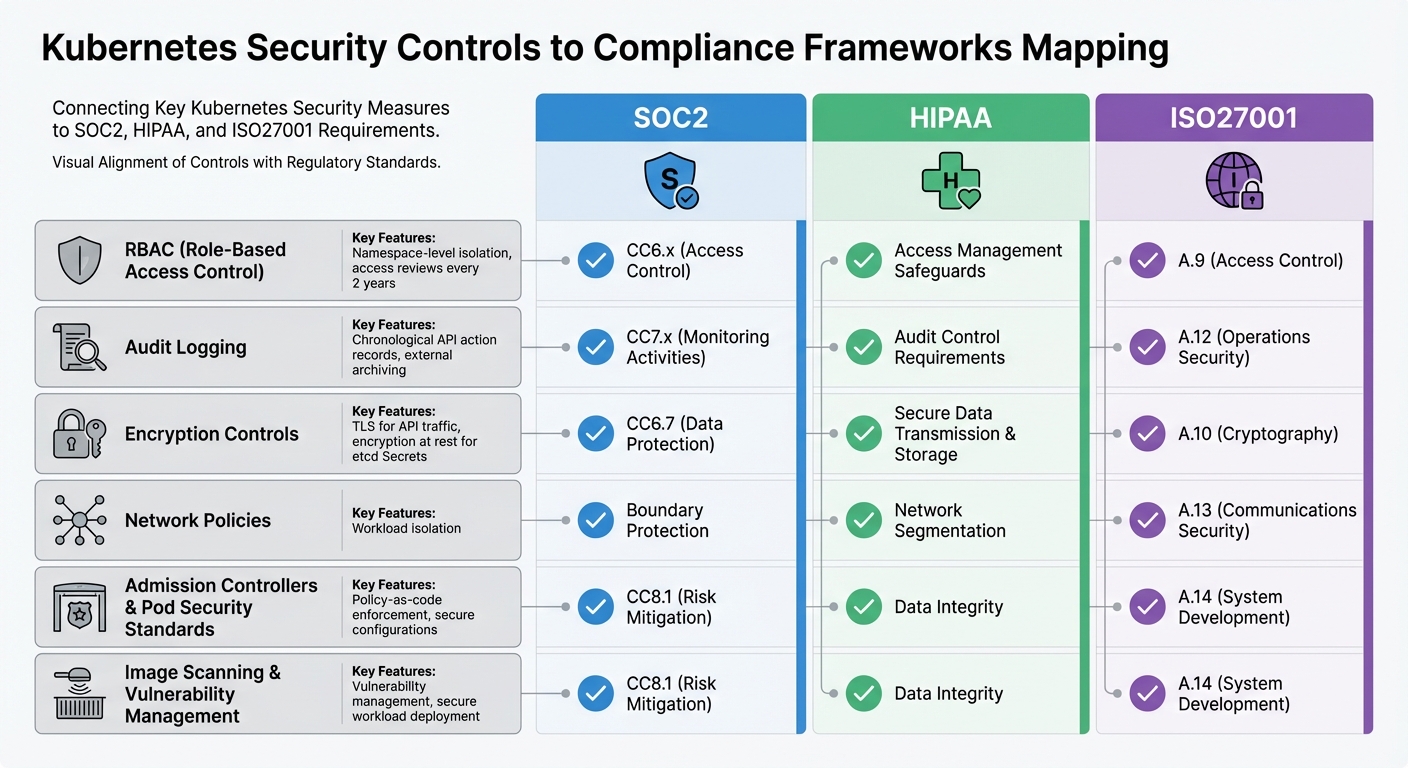
Kubernetes Security Controls Mapped to Compliance Frameworks
This section connects the technical controls of Kubernetes directly to compliance requirements, showing how they align with frameworks like SOC2, HIPAA, and ISO27001. By understanding these connections, you can ensure your Kubernetes setup supports audit readiness efficiently, without duplicating efforts. Below, we break down how specific controls satisfy these compliance standards.
How Kubernetes Controls Meet Compliance Requirements
RBAC (Role-Based Access Control) plays a critical role in enforcing least privilege. It aligns with SOC2's CC6.x (Access Control), HIPAA's access management safeguards, and ISO27001's A.9 (Access Control). It achieves this through features like namespace-level isolation and routine access reviews conducted at least every two years.
Audit logging ensures a detailed chronological record of API-driven actions, which is essential for compliance. It supports SOC2's CC7.x (Monitoring Activities), HIPAA's audit control requirements (when logs are secured and archived externally), and ISO27001's A.12 (Operations Security), aiding in incident detection and response.
Encryption controls, such as TLS for API traffic and encryption at rest for Secrets in etcd, address SOC2's CC6.7 (Data Protection), HIPAA's requirements for secure data transmission and storage, and ISO27001's A.10 (Cryptography).
Network Policies ensure workload isolation, meeting SOC2's boundary protection requirements, HIPAA's network segmentation standards, and ISO27001's A.13 (Communications Security).
Admission Controllers and Pod Security Standards enforce secure configurations through policy-as-code mechanisms. These controls support SOC2's CC8.1 (Risk Mitigation), HIPAA's data integrity requirements, and ISO27001's A.14 (System Development). Additionally, practices like image scanning and vulnerability management ensure only secure, compliant workloads are deployed, addressing all three frameworks.
How Cycore Simplifies Kubernetes Compliance
While Kubernetes controls map effectively to compliance frameworks, the process of collecting evidence and addressing gaps can be time-consuming. This is where Cycore steps in to streamline the process.
Cycore automates evidence collection from key areas like RBAC configurations, audit logs, and Network Policies. It identifies gaps in your compliance posture and directly implements fixes. For example, if your cluster lacks encryption at rest for etcd or your audit policy isn't capturing essential events, Cycore doesn’t just flag the issue - it resolves it. This allows your engineering team to focus on innovation while maintaining continuous audit readiness. For organizations operating in regulated environments, this means faster deal closures without compliance-related delays.
Conclusion
Kubernetes security involves a layered approach, addressing the control plane, network, workloads, and container images. The measures discussed in this guide - like RBAC, Network Policies, Pod Security Standards, admission controllers, audit logging, and encryption - serve as essential building blocks for protecting your environment. As the Kubernetes documentation aptly notes:
"Checklists are not sufficient for attaining a good security posture on their own. A good security posture requires constant attention and improvement, but a checklist can be the first step on the never-ending journey towards security preparedness."
Beyond these technical measures, aligning your setup with compliance standards is equally important. Whether you're aiming for SOC2, HIPAA, or ISO27001, these controls not only protect your infrastructure but also provide the documentation necessary for audit readiness. Implementing least privilege with RBAC, isolating workloads using Network Policies, and maintaining detailed audit logs lays the groundwork for passing regulatory audits.
However, staying compliant is no small feat. Tasks like conducting access reviews every two years, ensuring encryption for etcd, and keeping audit policies up to date demand constant effort. For many teams, this workload can distract from innovation and strain already limited resources.
This is where automation becomes a game-changer. By automating key security practices, you can enhance your Kubernetes security while reducing the operational burden. Cycore takes this challenge off your plate. It automates critical controls such as RBAC configuration, Network Policy enforcement, audit evidence collection, and real-time remediation. Instead of just tracking compliance tasks, Cycore executes them. Its AI-driven monitoring continuously scans your Kubernetes environment, identifies compliance gaps, and fixes them - ensuring you're always audit-ready without the manual effort.
With Cycore, audits become faster, operational stress decreases, and compliance stays consistent - all through a managed service at a predictable monthly cost. Kubernetes security requires ongoing diligence, but with Cycore, that diligence becomes effortless.
FAQs
How does Cycore simplify Kubernetes security and ensure compliance?
Cycore simplifies Kubernetes security by automating essential processes like Role-Based Access Control (RBAC), network policies, and secrets management. By handling these tasks automatically, Cycore ensures consistent protection for access and sensitive data across all your clusters, while cutting down on manual work and reducing the chance of mistakes.
On top of that, Cycore incorporates compliance standards for frameworks like SOC2, HIPAA, and ISO27001. It leverages automation to enforce security policies, keep an eye on configurations, and conduct regular audits. This not only keeps your environment secure and compliant but also strengthens defenses against potential threats.
What are the main advantages of using RBAC for Kubernetes security?
Role-Based Access Control (RBAC) in Kubernetes is a key method for tightening security by sticking to the principle of least privilege. This means users, applications, and services are granted just the permissions they need to carry out their specific tasks - nothing more. By doing so, it lowers the chances of unauthorized access or privilege misuse.
With RBAC, you can define clear roles and permissions, which helps limit potential vulnerabilities and makes managing access in complex Kubernetes setups more straightforward. Beyond boosting security, this approach also supports compliance with regulations like SOC2, HIPAA, and ISO27001, making it easier to meet industry standards.
How do Kubernetes Network Policies improve workload security and isolation?
Kubernetes Network Policies play a crucial role in securing workloads by regulating how network traffic flows between Pods, namespaces, and external systems. These policies empower administrators to define specific rules about which Pods can communicate with one another and with outside networks. This creates well-defined boundaries that block unauthorized access and curtail lateral movement within the cluster.
By limiting traffic based on IP addresses or ports, Network Policies shrink the attack surface and support a zero-trust security model. This approach is especially important in multi-tenant setups or when handling sensitive workloads. When paired with compatible network plugins, these policies help ensure workloads stay isolated, reducing the risk of accidental or intentional breaches. Additionally, they assist organizations in meeting security compliance standards like SOC2, HIPAA, and ISO27001.
Related Blog Posts
- Ultimate Guide To Security Roadmap Creation
- How to Write Remote Work Security Policies
- How Mandatory Access Control Supports SOC2 Compliance
- Common Issues in Security Configurations
{"@context":"https://schema.org","@type":"FAQPage","mainEntity":[{"@type":"Question","name":"How does Cycore simplify Kubernetes security and ensure compliance?","acceptedAnswer":{"@type":"Answer","text":"<p>Cycore simplifies Kubernetes security by automating essential processes like <strong>Role-Based Access Control (RBAC)</strong>, network policies, and secrets management. By handling these tasks automatically, Cycore ensures consistent protection for access and sensitive data across all your clusters, while cutting down on manual work and reducing the chance of mistakes.</p> <p>On top of that, Cycore incorporates compliance standards for frameworks like <strong>SOC2</strong>, <strong>HIPAA</strong>, and <strong>ISO27001</strong>. It leverages automation to enforce security policies, keep an eye on configurations, and conduct regular audits. This not only keeps your environment secure and compliant but also strengthens defenses against potential threats.</p>"}},{"@type":"Question","name":"What are the main advantages of using RBAC for Kubernetes security?","acceptedAnswer":{"@type":"Answer","text":"<p>Role-Based Access Control (RBAC) in Kubernetes is a key method for tightening security by sticking to the <strong>principle of least privilege</strong>. This means users, applications, and services are granted just the permissions they need to carry out their specific tasks - nothing more. By doing so, it lowers the chances of unauthorized access or privilege misuse.</p> <p>With RBAC, you can define clear roles and permissions, which helps limit potential vulnerabilities and makes managing access in complex Kubernetes setups more straightforward. Beyond boosting security, this approach also supports compliance with regulations like SOC2, HIPAA, and ISO27001, making it easier to meet industry standards.</p>"}},{"@type":"Question","name":"How do Kubernetes Network Policies improve workload security and isolation?","acceptedAnswer":{"@type":"Answer","text":"<p>Kubernetes Network Policies play a crucial role in securing workloads by regulating how network traffic flows between Pods, namespaces, and external systems. These policies empower administrators to define specific rules about which Pods can communicate with one another and with outside networks. This creates well-defined boundaries that block unauthorized access and curtail lateral movement within the cluster.</p> <p>By limiting traffic based on IP addresses or ports, Network Policies shrink the attack surface and support a <strong>zero-trust security model</strong>. This approach is especially important in multi-tenant setups or when handling sensitive workloads. When paired with compatible network plugins, these policies help ensure workloads stay isolated, reducing the risk of accidental or intentional breaches. Additionally, they assist organizations in meeting security compliance standards like SOC2, HIPAA, and ISO27001.</p>"}}]}